Reporting options in EZ Commerce give you the flexibility to pull shipment details that best support your needs. Standard Reports provide commonly requested information in a streamlined set of options. You can define whether reports are Time-based (dependent on date ranges) or Event-based (dependent on voyage departures), and the type of data that is included. Reports can be pulled as Freight or Shipment based, which alters how the data is shown. You can set up report schedules to receive them via email, and download them into Excel.
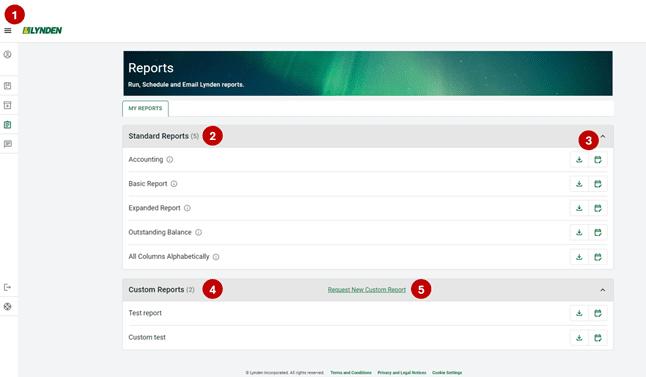
Once you are logged into EZ Commerce, navigate to the menu and click Reports.

Quickly find what you need in EZ Commerce Reports:
- The menu expands so users can access Trace or Shipping in EZ Commerce, send feedback, access help pages, or log out.
- View and access Standard Reports.
- Choose to either download or schedule a report.
- View and access your Custom Reports.
- Request a new custom report.